 touchretouch
TOUCHRETOUCH.ONLINE · INDEPENDENT GUIDE
TouchRetouch Guide: App, Online Options & How to Use It
TouchRetouch is ADVA Soft's photo-editing app, known for removing unwanted objects and other distractions. This independent guide helps you find the official app, understand common editing workflows and decide whether a browser editor fits your task. touchretouch.online is a separate service, not ADVA Soft's official website.
Try this edit online ↗What is TouchRetouch used for?
Official tutorials cover object and person cleanup, line and mesh removal, cloning, blur and background editing. Feature availability depends on the app, platform and device. Start with the official tutorial for your version rather than assuming every edition has the same controls.
Where to download the official app
Use ADVA Soft's official links, Apple's App Store or Google Play, and check that the developer is ADVA Soft. The source links below lead to the official listings. This website does not distribute the TouchRetouch app, APKs or desktop installers.
How to use TouchRetouch: the basic workflow
Open a photo, choose the tool suited to the distraction, mark or identify what should change, then inspect the edit before saving. The exact selection and confirmation steps vary by tool. ADVA Soft's tutorials explain the app-specific controls.
Looking for TouchRetouch online?
If you want to work in a browser, this site's independent editor offers object cleanup, background changes and local pixel tools. It uses its own processing and account credits. An app purchase does not unlock this service, and results should not be assumed equivalent.
Is TouchRetouch free?
The US Apple listing reviewed on October 18, 2026 shows a free download with in-app purchases; Google Play also lists in-app purchases. A free download is not unlimited free editing. Check the current offer in your store and app. Prices, trials and included features can differ by platform, region and plan.
How to get started
- Decide whether you want the official app or a separate browser workflow.
- For the app, follow an official store link and check compatibility and the displayed offer.
- Choose the editing tool that matches your photo: objects, people, lines, mesh or background.
- Compare the result closely and save a copy you want to keep.
RESULTS FROM OUR EDITOR
Explore the edits before choosing
These are recorded touchretouch.online results, not demonstrations of the official TouchRetouch app.

 BeforeAfter
A browser object-removal example
Recorded result from this independent editor, not an official TouchRetouch app demonstration.
Open this tool ↗
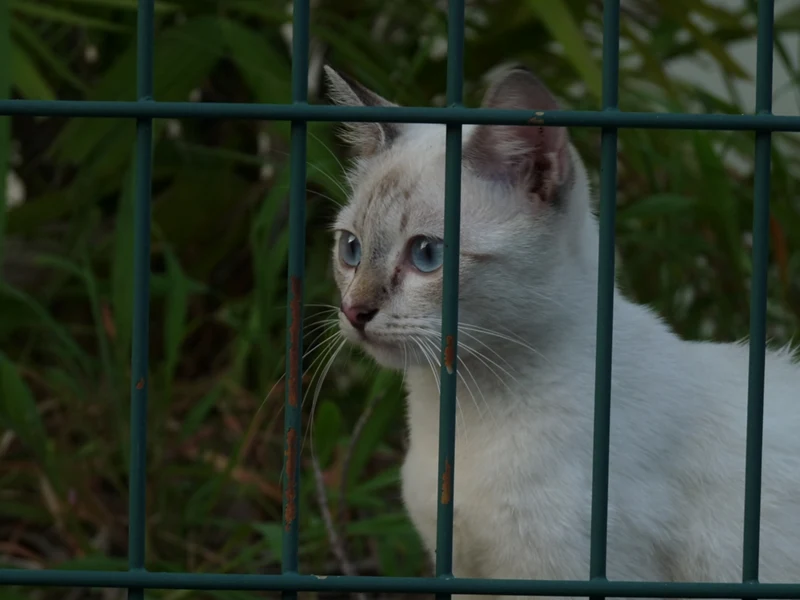 BeforeAfter
An example of generated mesh cleanup
The scene behind the fence is reconstructed. Review the subject's detail.
Open this tool ↗
 BeforeAfter
A browser background edit
Our recorded result illustrates the separate web workflow; it is not an app comparison benchmark.
Open this tool ↗GOOD TO KNOW
Frequently asked questions
Is touchretouch.online the official TouchRetouch web app?
No. It is an independent browser photo editor and is not affiliated with or endorsed by ADVA Soft.
Can I download TouchRetouch here?
No. Use the official App Store or Google Play links below. This site offers its own browser editor, not an app download.
Does my TouchRetouch subscription work here?
No. The ADVA Soft app and this independent service have separate accounts, billing and editing systems.
Where can I find a TouchRetouch tutorial?
ADVA Soft's official tutorial collection covers the app's tools. For this site's browser workflows, use our people, wire-and-fence and background guides.
FIND YOUR NEXT EDIT
TouchRetouch questions & photo editing guides
Remove People from Photos Online: A Practical Guide
Remove background people or select one photobomber in a photo. Learn which tool to use, who to protect and which details to check before downloading the edit.
Read the guide ↗Remove Wires & Fences from Photos Online: Tool Guide
Choose wire removal, mesh removal or a manual selection for cables and fences. Compare recorded examples and check crossings, edges and reconstructed detail.
Read the guide ↗Change Photo Backgrounds Online: Cutout, Replace or Blur
Choose a transparent cutout, your own background photo, an AI setting or background blur. Learn how to select the subject and inspect edges before saving.
Read the guide ↗TouchRetouch Guide: App, Online Options & How to Use It
Learn what TouchRetouch does, where to find the official app and how browser editing differs. Explore an independent online option with recorded photo examples.
Read the guide ↗TouchRetouch for PC & Mac: Official Options and Browser Editing
Looking for TouchRetouch on a computer? Check the official Mac compatibility, distinguish Windows emulator guides and try an independent browser editing workflow.
Read the guide ↗A TouchRetouch Online Alternative: Compare Editing Workflows
Compare the TouchRetouch app with an independent browser workflow for object removal, backgrounds and local tools. See real examples, limits and billing differences.
Read the guide ↗